During the implementation there are key terms we use to differentiate between specific types of PowerPoint content. You don't need to remember them - this page serves as a reminder to come back to if you are making decisions and don't have your Consultant or Account Manager to ask.
Brand
Your style and brand voice. The design elements such as colors, logos, fonts, and other visual cues that let’s your customers know when content is from your organization.
Template (Slide Master)
Within one presentation a consistent set of fonts, colors, look and feel to convey your brand. The template is your starting point to create a presentation and doesn’t contain any detailed written content.
Your brand may be presented in different ways requiring multiple templates. Common variations that require another template:
- Different sizing (A4 vs US letter)
- Completely different colors used
- Pitch vs Report style (sometimes these have very different looks and feels)
Common variations that do not require another template:
- Differences in content on slides such as disclaimers
- Different logos which are in the same positions
If teams use the same template, different sets of pre-arranged and pre-filled content can be included within the Library as decks. This way, a team can access ‘their’ template of slides which complies with the organization branding.
Want more? What is a Slide Master?
Layouts
The most common look and format of slides used in your presentations embedded within the template for quick and easy access. Here’s a visual aide to show an example of different layouts you can have directly within the template.
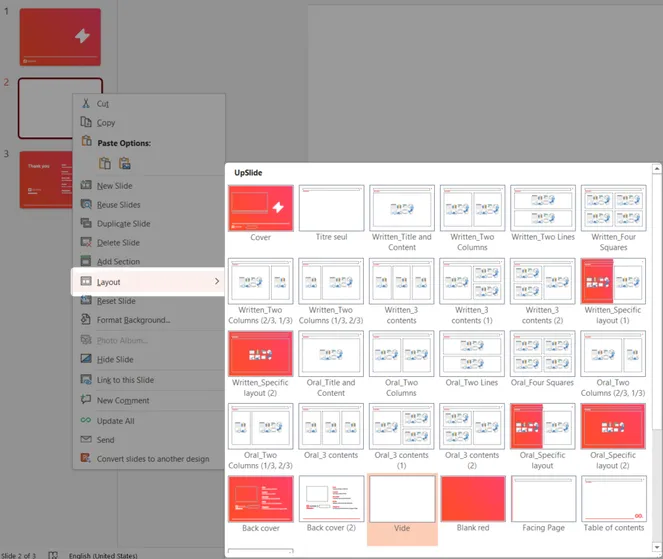
Want more? What is a slide layout?
Library content
The UpSlide Library is flexible and can contain a variety of content to be used in different ways. Our clients always use it in a combination of these ways to reflect how they produce documents.
Library Slides
In the Library you can add ready-to-use slides prefilled with content. For example:
- About our company
- About our service lines
- Sector overviews
- Historical financial slides
- Disclaimers
You can also add additional layout slides designed to give someone a large number of options. For example:
- 3 ideas vertical
- 4 ideas vertical
- 6 ideas tabular
- Short timeline
- Long timeline
Adding slides into the library rather than to the template makes standard presentations faster to produce and smaller in file size. Users also prefer having the search option in the library rather than a very large layout selection pane.
Library Decks
These are collections of slides that can be inserted in one click which follow and match the template. For example one team can have their slides insert with their specific sections and layouts. Another team has theirs in a separate area which includes their different order and exact layouts used.
We do this internally at UpSlide – we have one brand template which our Sales team and Consultants use. Both teams have their pre-filled decks for their most commonly produced presentations ready in the library for one click insertion for their clients.