.doc files not supported
Many recent MS Office features do not fully function when the document under edition is in Office 2003 .doc format.
Similarly, UpSlide features (mainly the Excel/Word link) are not 100% functional when confronted with .doc files. For example, right clicking a text export in a .doc file won’t give you access to the update or find the source features. Fixing all these little issues was deemed too big an investment given the decreasing usage of this format.
Therefore, as of UpSlide V4, .doc file format is not supported. If you encounter any issue when using UpSlide on such a format, please start by saving the file in a newer format such as .docx.
Office options not supported
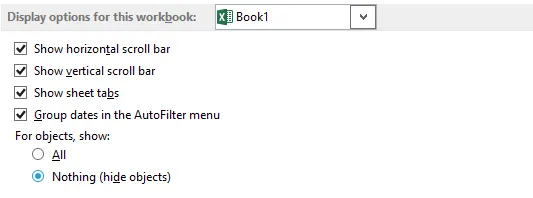
The Hide objects option in Excel is not supported. If objects are hidden in the active workbook (as is the case in the example below), UpSlide chart and export features will not function.