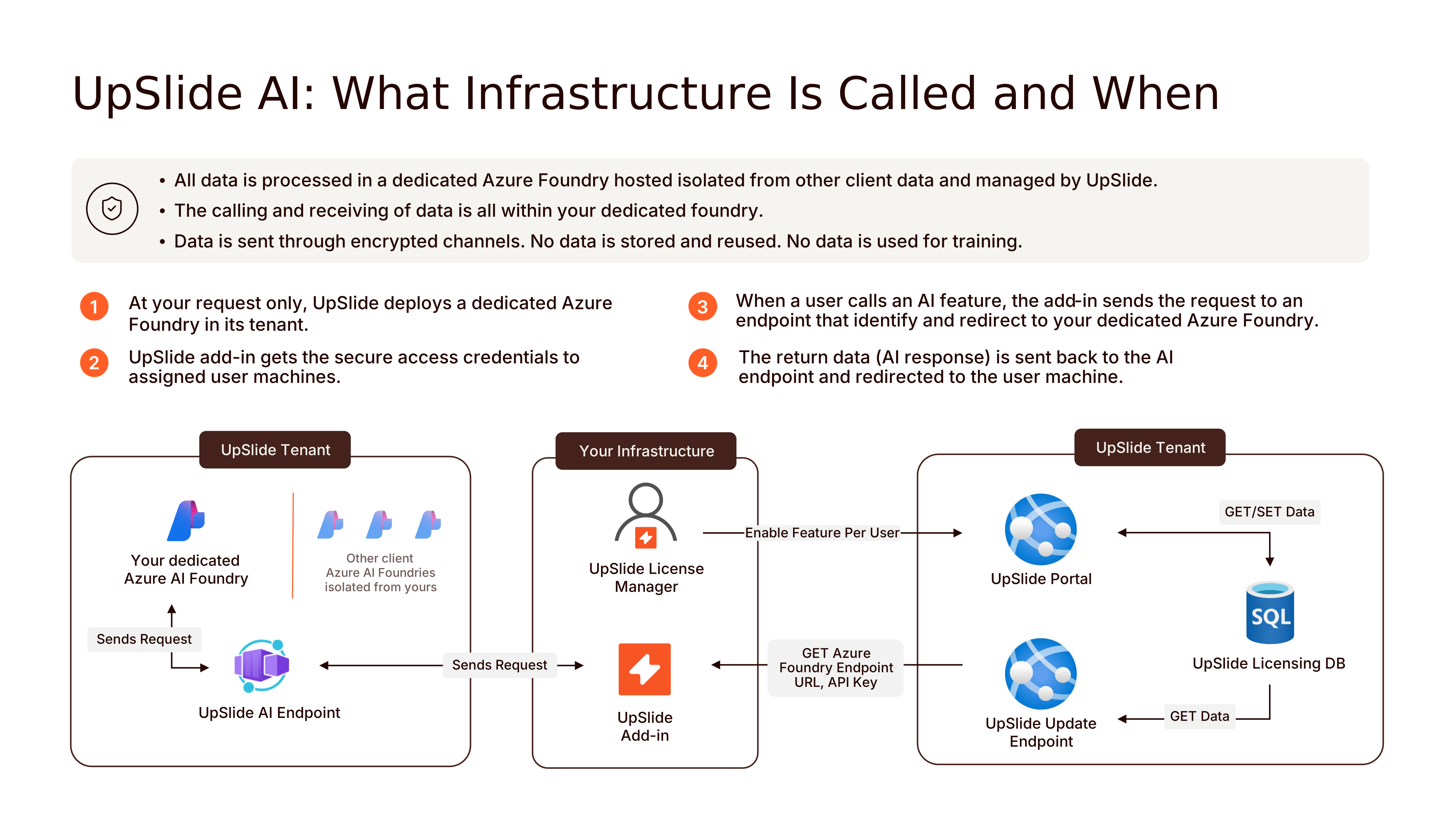
This article is a step-by-step guide to better understand how UpSlide connects and communicates with your dedicated Azure AI Foundry.
Communication details
UpSlide communication to our server is done through HTTPS (TLS 1.2) and encrypted with AES256.
- https://api.upslide.net/ai
- Data sent: User Information, prompt
- Data retrieved: OpenAI response.
Please refer to this page to find all UpSlide’s communications.
How it works
Model governance
We only use models that have proved their reliability and quality.
To prove that a model is reliable, we run it against our battery of tests, both automated and manual. We measure how well the model performs on real and synthetic documents. If (and only if) it passes our requirements, we allow this model to be used on our production environment.
Each and every AI feature (AI Assistant, AI Glossary, AI Consistency, etc…) has its own benchmark, and that each benchmark must be passed independantly. In other words, a model may be valid for feature A and invalid for feature B. In which case, we’ll only allow this model to be used for feature A.
We also run our tests for each new version of UpSlide, to guarantee that supported models still behave reliably with our latest code modification.
Finally, as the state of the art progresses, we revise our standard and raise the bar on quality. That means we’ll retire older models once they prove less reliable than more recent alternatives. That way, we guarantee you are always running on the best models for the task.