Need help with UpSlide? This article explains how to contact our support team and troubleshoot any issues you might encounter.
Support availability
Our support team is available by email Monday through Friday during the following hours:
- AEST: 5 PM - 8 AM
- CST: 4 PM - 7 AM
- CET: 9 AM - 12 AM
- ET: 3 AM - 6 PM
- PT: 12 AM - 3 PM
Contact the support team
You can reach our support team by sending an email to the address support@upslide.com. You can also use the Help button in the UpSlide ribbon:
- Open any Office application.
- Go to the far right of your UpSlide ribbon and click Help.
- In the drop-down, select Contact Support. Outlook creates a new email with a .zip file containing your application logs attached.
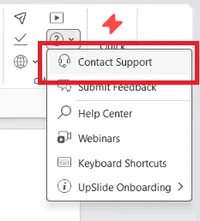
Using the Help button is the recommended way to contact support. The application logs provide useful information for investigating your issue.
If your default email application is the new Outlook, you may see an error when you select Contact Support.
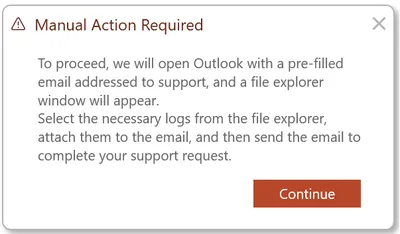
Due to technical limitations, the new Outlook cannot automatically create emails with attachments. Because the Contact support functionality includes your application logs, it does not work with the new Outlook.
To contact support using the new Outlook, select Continue in the error message. A folder containing a pre-prepared .zip file of your application logs opens, and a new email appears. Attach the .zip file to the email, describe your issue in the body and send the email.
Generate a log file
If you already have an open support request, the support team may ask you to generate a new log file to investigate changes in the behavior you are experiencing.
- Open any Office application.
- Press Ctrl + Shift + X to open the Log pane.
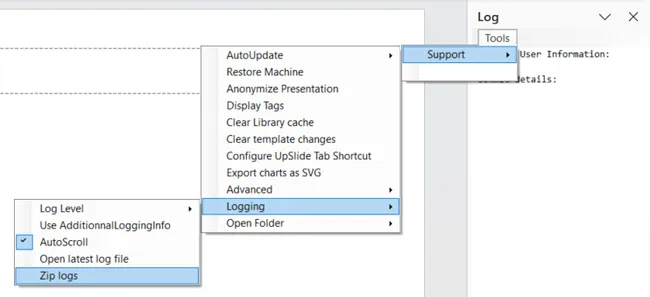
- Select Tools > Support > Logging > Zip logs.
- Select the folder where you want to save the .zip file.
- Send the .zip file to the support team.