This article is a step-by-step guide to better understand how UpSlide connects and communicates with your AI Assistant such as Claude or Copilot in M365.
See how UpSlide’s MCP server fits into the emerging M365 tech stack for Financial Services and how UpSlide bridges the gap between AI-generated drafts and the polished, client-ready documents.
Communication details
UpSlide communication to our server is done through HTTPS (TLS 1.2).
- https://api.upslide.net/ai
- The UpSlide desktop add-in maintains a persistent authenticated channel with the MCP server
- This channel:
- Is initiated outbound from the client environment.
- Avoids inbound firewall exposure.
- Remains scoped to the authenticated user session.
Please refer to this page to find all UpSlide’s communications.
How it works
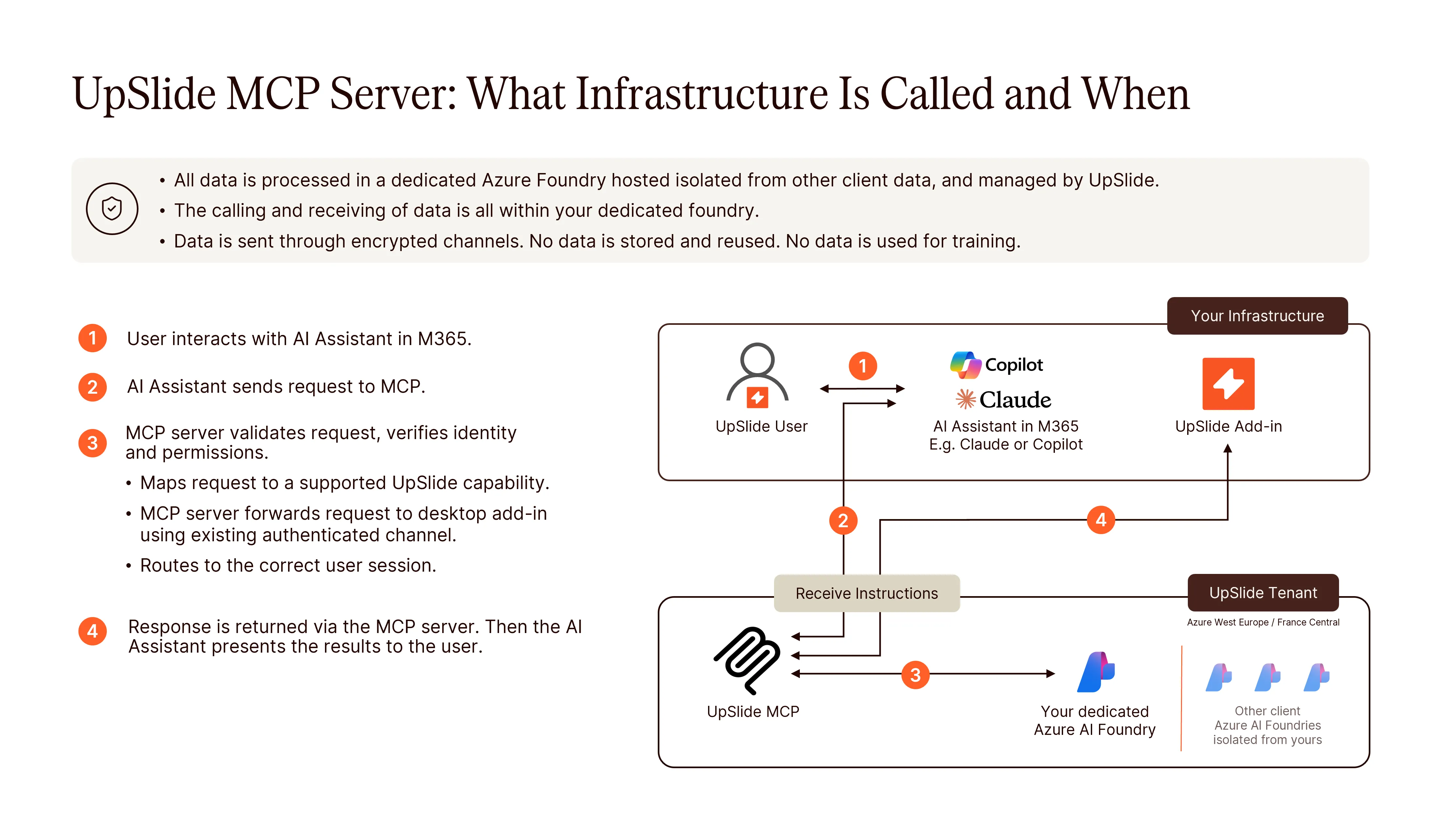
Data handling principles
- Tool execution is local. The MCP server does not need direct access to the user’s documents. They remain on the user’s machine.
- MCP acts as a relay, not storage. No long-term persistence of business data.
- No direct file system access by the MCP server. All actions mediated by the add-in
- Minimal data transfer. Only required instructions, context and results are transmitted from the AI Assistant to the MCP Server or from the Desktop Addin to the MCP Server
Desktop add-in to MCP Server
Depending on the feature used, some contextual data may be sent by the desktop add-in to our MCP server. For example, to list the existing Excel links, the desktop add-in needs to send the names of the source workbooks to the MCP server.
Some features already require sending the whole document. This is independent of the MCP server. If you run the Consistency Check directly by clicking the button in UpSlide, the whole document is sent.
LLM to MCP Server
Because of the non-deterministic nature of LLMs, we cannot guarantee that no sensitive data can be sent to our MCP server. However, using an AI Assistant in M365 (e.g. Claude) to analyze PowerPoint presentations already involveS transmitting slide content including text, images, notes, and metadata to this platform infrastructure (for instance Anthropic) for processing.
if you are already using a LLM platform, any data included in presentations should already be treated as potentially disclosed to the LLM platform, with associated confidentiality, compliance, and data residency implications.